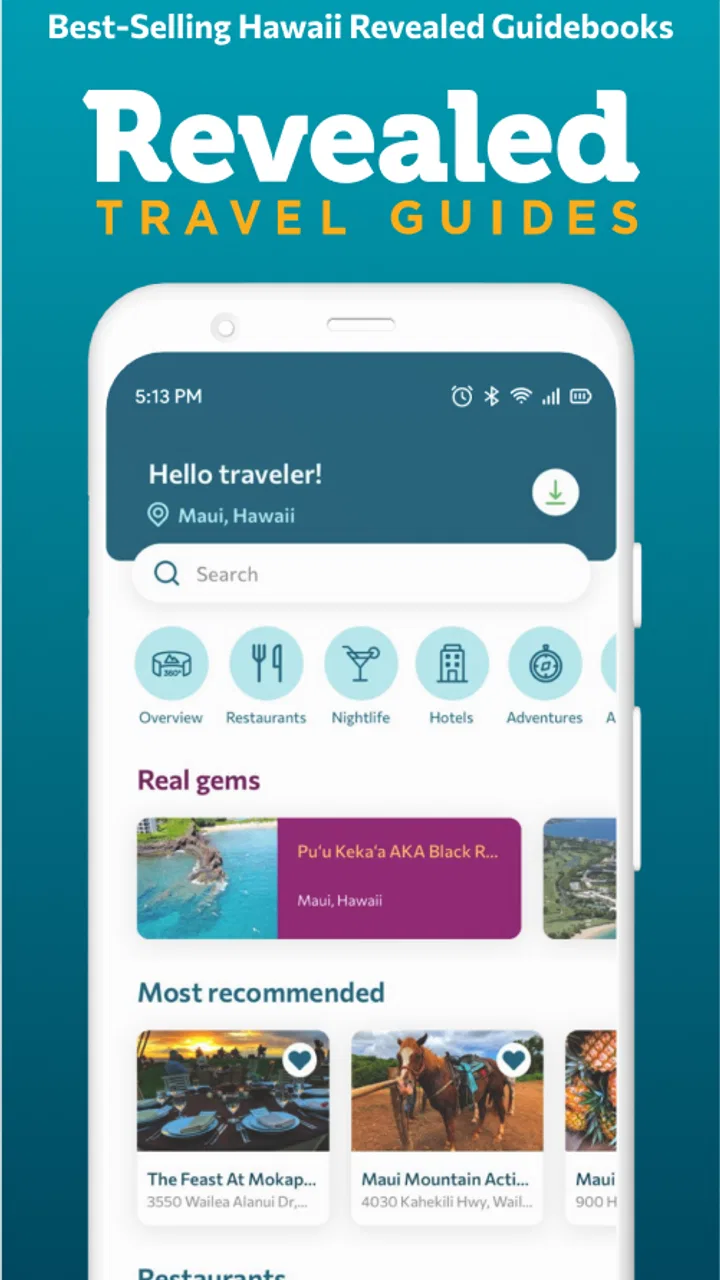
Revealed Travel Guides
- 3.9
- Rating
- 10.00K
- Installs
- Free
- Price

 Analysis by App-foxy
Planning a trip around Hawaii can be exciting right up until you need to decide what to see, when to stop, and how to keep your attention on the road. Revealed Travel Guides is built for that particular problem. It combines travel guides with GPS-audio drive tours, so I can learn about a place while moving through it instead of constantly checking a written itinerary.
My first impression is that this is more useful as a companion for a self-guided road day than as a complete travel planner. It does not try to replace every map, booking service, restaurant directory, or airline app on a phone. Its role is narrower and more interesting: helping me turn a drive into a guided experience. That makes it especially appealing for visitors who want more context than a standard navigation app provides but more freedom than a scheduled bus tour.
The app sits in the Travel & Local category and comes from Wizard Publications, Inc. It is free to install, rated for Everyone, and available for devices running Android 7.0 or later. The current version is 6.29.21, and optional in-app purchases range from $0.99 to $29.99 per item. I would treat the free installation as a chance to understand the layout and available material before deciding whether a particular paid item fits my trip.
You May Also Like

 AccuWeather: Weather Radar
AccuWeather Review: A Quick, Clear Forecast for Everyday Decisions
For everyday plans, the best forecast is the one you can understand quickly. AccuWeather makes rain timing, radar, and local conditions easy to act on, with a few trade-offs.

 Hill Climb Racing
Why Hill Climb Racing Still Turns Crashes Into One More Run
A tiny car, a bumpy hill and one more upgrade: Hill Climb Racing keeps resurfacing because its simple chaos makes every near-miss feel personal.

 AliExpress - Shopping App
AliExpress Makes Global Shopping Feel Personal, but Shoppers Bear the Risk
AliExpress turns a global marketplace into a pocket-sized discovery engine. Its reach is useful, its shopping loop compelling, and its trade-offs easy to miss.

 Lords Mobile: Kingdom Wars
Lords Mobile Is a Kingdom-Building Routine, Not a Quick Match
A case-by-case verdict on the building, battles, device demands, and social commitments that make Lords Mobile rewarding for some players and exhausting for others.

 PDF Scanner app - TapScanner
TapScanner Makes Paperwork Easier to Capture, Check, and Share
TapScanner makes scanning with a phone feel less like a rescue operation and more like a dependable step in getting work done. Its capture tools are useful, though not flawless.

 Block Blast!
Block Blast! Shows How Much a Puzzle Game Can Leave Out
A quiet grid game shows why puzzle players increasingly value instant clarity, repeatable skill and low-pressure play—and where the genre still needs to catch up.
More From Our News Desk
View All News


What to expect before you set off
The most important expectation to set is that this is not simply a list of attractions. The GPS-audio format is intended to add spoken guidance to a drive, which changes how I use it. Instead of stopping to read a long description at every viewpoint, I can listen as the route develops and keep the visual part of my attention on the surroundings.
That approach works best when the journey itself matters. A drive along a scenic coast, through changing landscapes, or between several planned stops can feel disconnected when I use only a map. A conventional map tells me where to turn, while a basic guidebook tells me what a place is. An audio tour can connect the two by giving the road a sense of sequence and meaning.
I would not expect the app to make every travel decision for me. I still need to think about fuel, weather, road conditions, opening hours, parking, and how much time I actually have. The app’s value is in interpretation and orientation, not in removing the practical responsibilities of traveling. That distinction matters because a first-time visitor may otherwise assume that a guided route automatically covers every detail of a day out.
Its Hawaii focus is a natural starting point, but the app is presented as covering Hawaii and destinations beyond it. I would therefore browse the available guides before building an itinerary around one. The useful question is not just “Does it cover my destination?” but “Does the available guide match the kind of day I want?” A scenic drive, a history-focused outing, and a quick transfer between towns call for different levels of narration.
For me, the strongest use case is a traveler who wants independence without feeling completely uninformed. I can choose my own departure time, pause for photographs, adjust the pace, and still receive an organized layer of storytelling. Families may also appreciate that arrangement because it gives a drive more structure without requiring everyone to follow a group leader.
There is a trade-off. Audio guidance is less convenient if I prefer to skim information silently, jump between unrelated attractions, or make spontaneous detours every few minutes. A written guide or a general map may be better for that style. This app makes the most sense when I am willing to follow a route for a while and let the experience unfold.
How it differs from ordinary travel tools
A mapping app is usually excellent at directions and weak at atmosphere. A printed guide is often rich in background but awkward to consult while driving. A live tour can offer a human guide but usually comes with a fixed schedule and meeting point. Revealed Travel Guides occupies the space between those choices: a more prepared experience than driving with a map alone, but a more flexible one than joining a group.
That middle position is also why I would not use it as my only travel tool. I would keep a normal navigation option available for traffic, alternate routes, and last-minute changes. I would use this app for the guided content, then switch attention to practical navigation when the road situation requires it. The best workflow is complementary rather than competitive.
One subtle advantage of that combination is that it separates two kinds of attention. The map handles immediate movement, while the audio guide handles the broader story. When those jobs are mixed together in one crowded screen, I can end up missing both the turn and the view. Keeping the app’s purpose clear makes it easier to use responsibly.
From installation to the first useful tour
I’d start by treating the first tour as a low-stakes test, not a commitment to follow every suggestion. Choose a drive you already expect to take, check that the guide fits its direction, and get the audio ready before setting off; that gives you a fair sense of whether spoken context suits your travel style. Once that groundwork is done, the next section looks at how to turn installation into a useful first outing.
Start with a destination, not with every menu
After installing the app, I would resist the temptation to explore every available guide immediately. The fastest route to a meaningful first experience is to choose one realistic drive that fits the trip I already have in mind. If I am visiting Hawaii for a short stay, I would select the route that matches my planned area rather than trying to collect material for the entire island chain.
This simple choice prevents a common travel-app problem: spending more time organizing possibilities than enjoying the destination. I would first decide whether the day is mainly for sightseeing, moving between places, or filling an open afternoon. Then I would look for the guide that supports that purpose. The app becomes much easier to judge when I evaluate it against a real journey instead of browsing it abstractly.
Before leaving, I would open the selected guide while connected to a reliable network and read through its basic presentation. I would look for the route’s starting point, the expected direction of travel, and the places it appears to connect. Even without overplanning, this gives me a mental outline. A GPS-audio tour is more enjoyable when I know roughly what kind of road day I am beginning.
I would also check the purchase screen carefully before starting a paid guide. The app itself is free, but individual in-app purchases can range from $0.99 to $29.99. That wide range means the cost may depend on the item I choose, so I would confirm the exact option and price shown on my device rather than assuming every guide is included with installation.
Make the first successful action deliberately small
The first success should not be completing an entire island drive. It should be starting a guide, confirming that the route is relevant, and hearing enough of the narration to understand how the experience works. I would begin before reaching the busiest part of the road, with the phone secured and the route already selected.
Once the audio begins, I would give it a few minutes before judging it. The point is not merely to hear isolated facts; it is to see whether the narration fits the movement of the drive. Does it help me notice the landscape? Does it give a reason to care about an upcoming area? Does the pacing leave room to enjoy the view? Those are more useful questions than whether the opening screen looks impressive.
A practical first-day scenario would be a couple leaving their accommodation in the morning with a flexible afternoon ahead. They can choose a drive tour that matches their direction, start it before departure, and use the narration to add context between stops. When they find a viewpoint or interesting area, they can pause the experience, explore at their own pace, and resume when ready. That is a better fit than trying to listen continuously while rushing through a packed schedule.
I would keep the first outing intentionally forgiving. Choose a route where missing one spoken detail will not ruin the day, and leave enough time for breaks. This matters because travel apps are easiest to understand when I am not simultaneously dealing with a tight reservation, unfamiliar roads, and a low battery. A relaxed trial reveals the app’s strengths without turning small friction into a crisis.
Use the guide as a layer over the journey
The most effective habit is to treat the narration as a companion rather than an instruction manual. I would listen for context, landmarks, and suggestions, but I would not allow the app to override common sense or posted road information. If traffic changes, weather worsens, or a local restriction affects the route, practical conditions take priority.
This is also where the GPS element needs a realistic interpretation. Location-aware guidance can make a drive feel more connected to the places around me, but it does not remove the need to know where I am going. I would glance at the route only when safely stopped, and I would avoid interacting with the phone while driving. The app is most helpful when prepared in advance rather than operated constantly from behind the wheel.
For passengers, the experience can become more collaborative. One person can follow the route and handle pauses while the driver concentrates on the road. In a family group, a passenger can decide whether a suggested stop fits the children’s energy and the day’s timing. That small division of responsibility turns the app from a private listening tool into a shared travel aid.
Common confusion that can affect the first outing
The first point of confusion is the difference between a guide and a general-purpose navigation service. I would not assume that selecting an audio tour gives me every navigation function I use elsewhere. The guide’s job is to enrich the drive; a dedicated map remains useful for exact routing, live changes, and finding unrelated places such as a pharmacy or fuel station.
The second is the meaning of “beyond” Hawaii. Since the app presents guides for Hawaii and additional destinations, I would inspect the actual selection available in the app before making a firm plan. Coverage can be useful without being universal, and the right way to avoid disappointment is to match the guide list to the places I genuinely intend to visit.
The third is the relationship between free access and paid content. Installing the app costs nothing, but some individual items are available through in-app purchases. I would not begin a drive assuming that every route is unlocked. Checking the guide’s purchase state before departure is a small step that avoids an awkward roadside interruption.
Another practical confusion is when to pause. If I stop for lunch, a photograph, or an unplanned walk, I would pause the tour rather than letting the narration continue in the background. Otherwise the spoken sequence may no longer match what I am seeing. This is one of the less obvious habits that makes a GPS-audio experience feel coherent instead of disjointed.
I would also plan for ordinary phone limitations. Audio can be hard to hear over road noise, and a passenger may need to adjust the volume while the car is parked. A vehicle’s audio system may improve the experience if it is already available, but I would not assume a particular connection method or accessory. The safe approach is to test sound before leaving and keep the phone secured.
Who will benefit most, and who should choose something else?
This app is a strong match for first-time visitors who want to understand the places they pass rather than simply reach them. It also suits independent travelers who dislike fixed tours, couples planning scenic drives, and families looking for a shared activity during a long stretch of road. People who enjoy learning through spoken explanations may find it more natural than repeatedly reading from a screen.
I think it is less suitable for travelers whose plans change constantly. If every day is built around spontaneous turns, short transfers, or rapid attraction-hopping, a route-based audio experience may feel restrictive. It may also be the wrong choice for someone who wants detailed booking information, live traffic intelligence, or a broad directory of local services in one place. A map, itinerary planner, or specialized booking app would serve those needs more directly.
Accessibility and listening preferences matter as well. Someone who cannot comfortably follow audio while traveling may prefer written material, and a group with very different interests may not agree on one narration. In that situation, I would use the app selectively, perhaps during a quieter scenic section, rather than expecting it to entertain everyone for the entire day.
Small habits that make the experience better
My first useful tip is to choose the tour around the driver’s actual route, not the other way around. It is tempting to reshape a whole day to fit an appealing guide, but that can create unnecessary time pressure. If the tour complements the route already planned, I can stop when something interests me without feeling that every minute is committed.
My second tip is to separate listening time from exploration time. I would let the narration play while traveling, then pause at a place that deserves attention. This avoids the common mistake of staring at the phone during the very scenery the guide is helping me appreciate. The app adds value when it sends my attention outward.
My third tip is to use a passenger as the tour manager whenever possible. That person can start, pause, and resume the guide, note an appealing stop, and keep the driver from handling the phone. This is a small workflow change, but it improves safety and makes the experience less fragmented.
A fourth insight is to judge a guide by how well it supports the gaps between major attractions. Famous stops already receive plenty of attention from ordinary travel websites. The more revealing test is whether the narration makes the connecting road feel worthwhile. If it does, the app offers something genuinely different from a list of popular places.
Finally, I would leave room for silence. Continuous narration can become tiring, especially on a long day. Pausing for a while does not mean the app has failed; it means I am using it at the moments when context is most helpful. A good self-guided tour should support the trip rather than dominate it.
My recommendation after using it as a travel companion
Revealed Travel Guides is a focused travel app with a clear purpose: bringing guide-style context to drives through Hawaii and other covered destinations. I like that it encourages a more independent form of sightseeing. I can keep control of my schedule while still receiving a sense of place that a standard navigation screen rarely provides.
The experience is best when I prepare before moving, choose a route that fits my day, and let a passenger handle the phone. The main friction comes from needing to distinguish guided content from general navigation, check which material requires a purchase, and accept that a route-based tour will not suit every travel style. None of those issues makes the app unusable, but they do shape how satisfying it will be.
The app has an average rating of 3.9 from around 128 ratings, with over 10K installs, which suggests a modest but established audience rather than a universally dominant travel platform. I would read that as a reason to try it against my own itinerary, not as a final verdict. Its usefulness depends heavily on whether one of the available guides matches the drive I want to take.
For a first-time user, my recommendation is simple: install it before the trip, browse for a route that fits a real day, review any purchase choice while still comfortable, and test the audio before leaving. Start with one manageable outing instead of trying to organize the entire vacation through the app. If the narration helps me notice more and plan less, it has earned a place in my travel setup.
My bottom line: choose it when you want the freedom of a self-guided road trip with more personality than a map alone. Skip it when your priority is live navigation, reservations, or completely spontaneous movement. Used for the right kind of journey, it can turn the space between attractions into part of the experience rather than time spent merely getting there.
FAQs for Revealed Travel Guides
01What is Revealed Travel Guides and what can I use it for?
Revealed Travel Guides is a travel-planning app designed to help users discover destinations through curated guides, recommendations, and practical information. It can be useful when researching places to visit, choosing attractions, finding restaurants or activities, and organizing ideas before or during a trip. The app is aimed at travelers who prefer structured suggestions rather than searching through many unrelated websites.
02Does Revealed Travel Guides work offline while traveling?
Offline availability can depend on the specific guide and the features supported by the current app version. Travelers should open and save the relevant destination content before leaving a reliable internet connection, especially if they expect to use it abroad or in areas with weak service. It is also sensible to keep important addresses, reservations, maps, and transport details available separately in case some content requires an online connection.
03Is Revealed Travel Guides free to download and use?
The app may be free to download, but some guides, destinations, premium recommendations, or additional features can require payment or an in-app purchase. Before downloading or subscribing, check the listing for the latest pricing, included content, and renewal conditions. Users should also review whether purchases are one-time payments or recurring subscriptions, since availability and pricing may differ between Android and iOS.
04Does the app provide reliable and personalized travel recommendations?
Revealed Travel Guides focuses on curated travel information, which can make planning faster and more convenient than relying only on general search results. However, recommendations may reflect editorial choices and may not suit every budget, travel style, or accessibility requirement. Opening hours, prices, transportation services, and local rules can change, so users should verify essential details with official sources before making reservations or visiting.
05Who would benefit most from using Revealed Travel Guides?
The app is particularly useful for travelers who want destination inspiration, organized suggestions, and a simpler way to explore what a place offers. It may suit first-time visitors, couples, families, and independent travelers who appreciate ready-made ideas. Users seeking highly specialized planning, live transport updates, detailed accessibility information, or comprehensive booking tools may still need to combine the app with official tourism and travel services.
Pros
- Helpful destination guides with practical travel tips
- Covers attractions
- local culture
- food
- and useful activities
- Easy-to-browse content for planning trips on the go
- Can inspire itineraries beyond the most popular landmarks
- Useful reference for travelers seeking local experiences
Cons
- Coverage may be limited for lesser-known destinations
- Some information could become outdated as places and prices change
- Travel recommendations may not suit every budget or travel style
- Requires internet access for the latest guide content
- Limited value if you already have a detailed trip itinerary

Revealed Travel Guides
Gallery